Computing
 |
|
|
Hello! My name is Ms. Dixon-Ricketts and I lead computing at Elms Farm Primary School. I think computing is so important to learn at primary school because in the modern day we use computers every single day of our lives. At Elms Farm we learn how to use them well and safely.
Our Vision
Computing constitutes a fundamental component of the curriculum at Elms Farm Primary School, where it is imparted to students from Nursery through to Year 6. This subject equips pupils with essential digital skills that are crucial for navigating a technology-driven world. By fostering computational thinking, creativity, and problem-solving abilities, our computing program aligns with the objectives outlined in the National Curriculum (2013). These skills are increasingly recognised as foundational for future learning and employment, enabling children to become active participants in a digital society (Unterweger et al., 2025).
Our pedagogical approach integrates computing across the curriculum, utilising a diverse array of websites, applications, and software to enhance learning in other subjects. In the Early Years Foundation Stage (EYFS), we adhere to the Barefoot Computational Thinking framework, which priorities problem-solving strategies and unplugged activities designed to cultivate conceptual understanding (Barefoot Computing, 2025). This framework lays the groundwork for pupils to develop critical thinking skills in a supportive environment.
In Key Stages 1 and 2, we deliver the computing curriculum through the Teach Computing scheme, developed by the National Centre for Computing Education (NCCE). This scheme is underpinned by twelve evidence-based pedagogical principles, which include semantic waves for concept development, pair programming to foster collaboration, and physical computing to facilitate hands-on engagement (NCCE Pedagogy Principles, 2025). By employing these principles, we ensure that our teaching methods are both effective and engaging, thereby enhancing the overall learning experience for our pupils.
By embedding computing within meaningful contexts and prioritising both technical and creative dimensions, Elms Farm Primary School ensures that pupils cultivate confidence, competence, and curiosity in the digital realm. Our curriculum adopts a spiral approach, systematically revisiting and building upon prior knowledge to reinforce learning. Furthermore, it incorporates bespoke elements tailored to meet the individual needs of our pupils, ensuring that every child has the opportunity to thrive. This curriculum is meticulously mapped to the National Curriculum, thereby providing ample cross-curricular opportunities that enrich the educational experience.
The commitment of Elms Farm Primary School to computing education not only prepares pupils for the demands of the modern world but also instils a lifelong love of learning. Through a comprehensive and integrated approach, we aim to equip our students with the skills necessary to navigate an increasingly complex digital landscape, fostering a generation of innovative thinkers and problem solvers.
Aims:
The National Curriculum for Computing aims to ensure that all pupils:
- can understand and apply the fundamental principles and concepts of computer science, including abstraction, logic, algorithms and data representation
- can analyse problems in computational terms, and have repeated practical experience of writing computer programs in order to solve such problems can evaluate and apply information technology, including new or unfamiliar technologies, analytically to solve problems
- are responsible, competent, confident and creative users of information and communication technology.
Learning Journey
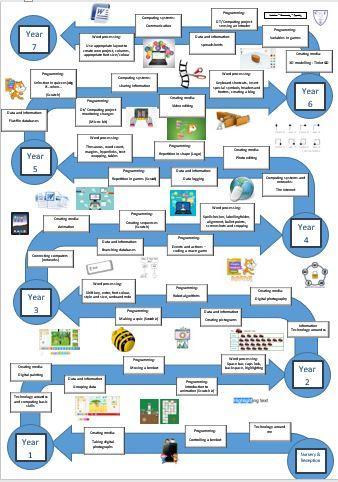
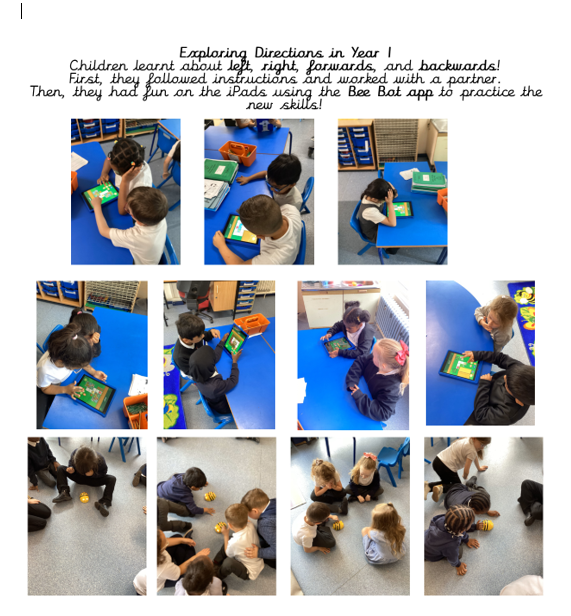
The integration of computing in the Early Years Foundation Stage and subsequent years fosters essential skills in problem-solving and critical thinking. Look at our children hard at work.
Children in EYFS utilised the floor mats to programme the Beebots, employing multiple steps to navigate them effectively. Scan the QR codes to observe our programming in action.


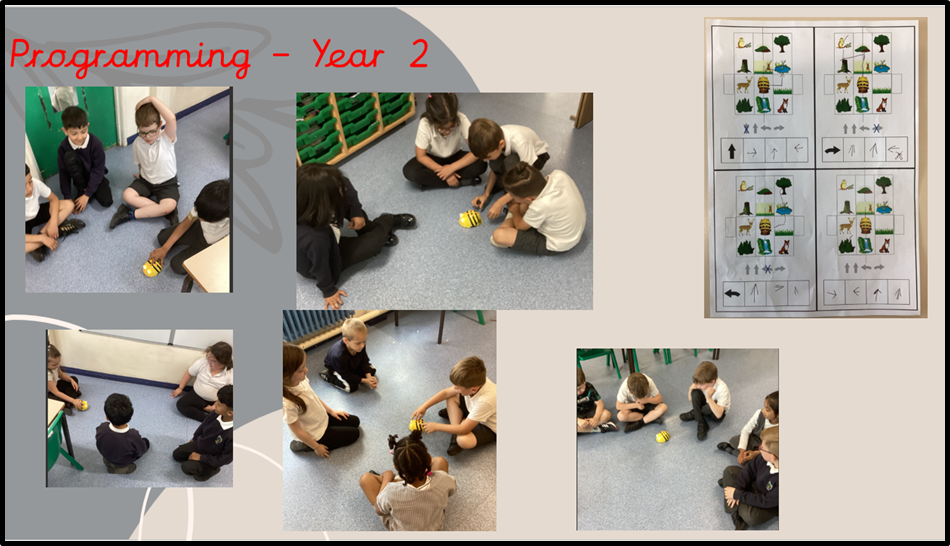
The children learned how to change sprites and backdrops, give commands, and program multiple sprites while exploring differences between blocks. They combined instrument sounds with changing backgrounds and sprites, and began planning their own projects.
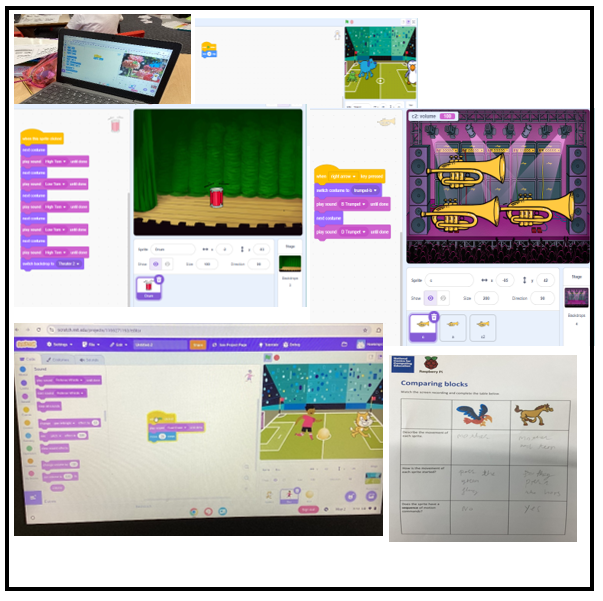
In Year 4, the children have been creating loops and animating names on scratch. Click the links below to see our work:
Creating Loops
https://scratch.mit.edu/projects/1175071840
Animating Names
https://scratch.mit.edu/projects/1193450541
https://scratch.mit.edu/projects/1193450356
https://scratch.mit.edu/projects/1189202922
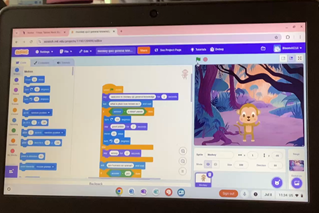
In Year 5, we have been making games on scratch. Click on the links below to play some of our games.
https://scratch.mit.edu/projects/1237500799
https://scratch.mit.edu/projects/1237503609
Year 4 and 6 took part in the microbit project with Amazon last year:
Theme: Coding for Climate Action with the micro:bit
Teaches students how to use computer science to protect the planet!
Amazon Future Engineer has teamed up with schools to help students learn how technology can be used to investigate and mitigate some of the impacts of climate change. A cross curricular unit covering the national curriculum in computer science, as well as elements of science and engineering, students learn about climate action.
Elms Farm School partnered with Sarah Fitzgerald (Entrust) deliver the Code for Climate Action Project to our Year 4 and Year 6 pupils. This exciting initiative introduced children to the impact of climate change through hands-on learning and technology.
Year 4 explored data logging by engaging in activities that measured and recorded changes, helping them understand how data can be applied in real-world contexts. Both year groups were introduced to Micro:bits, using them to log data and learn about inputs and outputs. These sessions encouraged problem-solving, creativity, and a deeper understanding of how technology can support climate awareness.
Online Safety
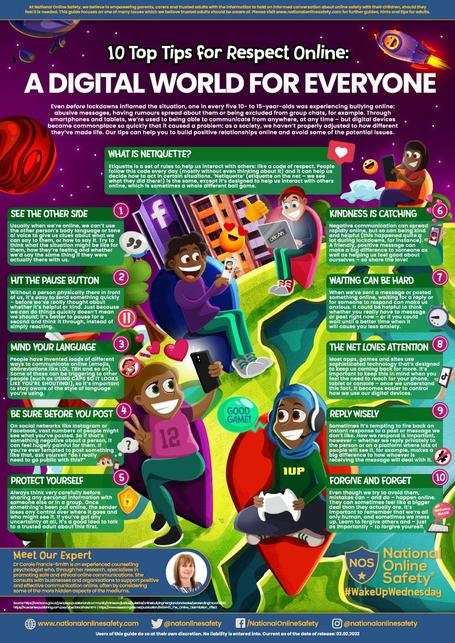
At EFPS, we aim to equip children with the knowledge and understanding of how to stay safe online. Teachers utilise resources from National Online Safety, focusing on key safeguarding themes as outlined in Keeping Children Safe in Education (KCSiE). Online safety is integrated into our curriculum on a fortnightly basis, employing materials from the National College alongside our PSHE and computing subjects.
This vital aspect of education is embedded within every computing unit and is further reinforced through whole school initiatives, assemblies, and themed events, including Safer Internet Day. We employ real-world scenarios, engaging discussions, and pertinent case studies to foster pupils' understanding of digital risks. Feedback from pupil voice indicates that our children feel confident in discussing safe online behaviour. Our comprehensive online safety lessons are documented on J2Journal, part of the BGFl 365 platform, ensuring transparency and continuity in our safeguarding efforts.
Elms Farms being part of Safer Internet Day 2025 – Live lesson BBC Teach

Safer Internet Day 2025 – Live Lesson - BBC Teach
Ensuring safety on the internet is of paramount importance. To assist parents of children aged 0-5 and 6 – 10 below is a delightful and engaging stop motion animated video that outlines valuable advice and tips for fostering online safety. This resource is designed to equip parents with essential knowledge to help their children navigate the digital landscape securely.
Useful links:
Useful links
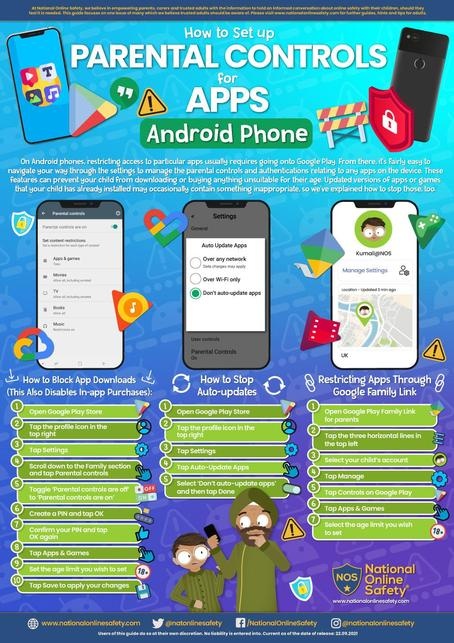
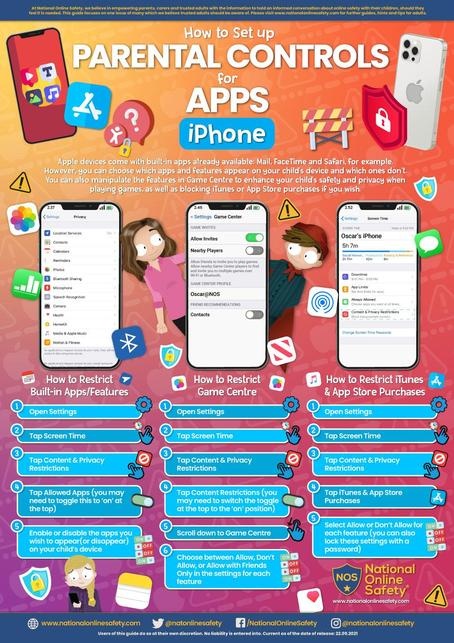
Links to parental controls for various networks
Step-by-step guides to set controls for various devices
Step-by-step guides to setting privacy settings for various social media platforms
Guide to student wellbeing apps
Supporting children with SEND needs online
E-Safety tips for children under 5s
E-Safety tips for children under 10s
Documents
- Computing LTP
- Programming skills progression
- Word processing skills progression
- Creating media skills progression
- Data and information skills progression